Wednesday, 16 July 2008

Researcher to Unveil Universal Attack Code for Intel Chips

Security Researcher and Author Kris Kaspersky claims to have found a flaw in Intel's processors that may allow hacker to gain full control on the kernel level remotly or just crash the system using JavaScript or TCP/IP packets, regardless of what operating system the computer is running.

He is going to demonstrate how such an attack can be made in a presentation at the upcoming Hack In The Box (HITB) Security Conference in Kuala Lampur, Malasia, during October. The proof-of-concept attacks will show how processor bugs, called errata, can be exploited using certain instruction sequences and a knowledge of how Java compilers work, allowing an attacker to take control of the compiler. Further he said, He is going to show real working of code and make it publicly available.

The attack takes advantage of known errata in chips, which most vendors have a workaround for in BIOS, but not all. XP, Vista, Linux, BSD and Mac operating systems are all vulnerable. [InfoWorld via engadget]

Saturday, 12 July 2008

New Feature: Embedded Comment Form in Blogger Blog

blogger comment form

Finally Blogger.com added the most most awaited feature in their blogging platform that is "Embedded Comment Form" like WordPress blogs. In the old comment system, the comment form was on a separate page so the commenter have to click the Post a Comment link to get to the form, causing for low comments. Most Blogspot Blogger's were complaining about this. Now with the new feature of “Embedded Comment Form” you can put the form at bottom of the post.


How to Embedded Comment Form

1) First you have to login to your Blogger.com account through http://draft.blogger.com/. To Enable this Comment Form you must have to login through http://draft.blogger.com/.

2) Choose your blog and Goto Settings >> Comments. Search for the "Comment Form Placement" setting and set the option to "Embedded Below Post" and Save Your Settings.

comment-form-placement

3) Now you should see a comment form below your post. If you don't see the comment form then read the information below very carefully.


Do you use Customized Template?

If you use customized or modified template then you need to replace some HTML code lines in your blog template to display this Comment Form on your blog. Just go through the following steps and you will find a new Comment Form below your post.

1) Go to your blogs Dashboard then go to Layout >> Edit HTML. Before editing the HTML just Backup your template so if you do any mistake, you won't loose anything.

2) Tick the Expand Widget Template option.
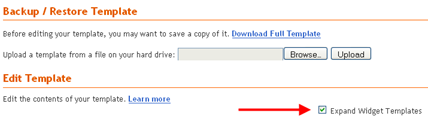
Expand Widget

3) Find the Following code in the Template Editor. If you have difficulty finding the code, just search for postCommentMsg from your browsers search option.

<p class='comment-footer'> <b:if cond='data:post.allowComments'> <a expr:href='data:post.addCommentUrl' expr:onclick='data:post.addCommentOnclick'><data:postCommentMsg/></a> </b:if> </p>

4) If you found the above code then Replace it with the following code and Save Your Template.

<p class='comment-footer'> <b:if cond='data:post.embedCommentForm'> <b:include data='post' name='comment-form'/> <b:else/> <b:if cond='data:post.allowComments'> <a expr:href='data:post.addCommentUrl' expr:onclick='data:post.addCommentOnclick'><data:postCommentMsg/></a> </b:if> </b:if> </p>

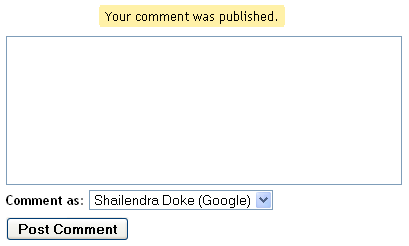
Just go and check your blog’s post page, You will find a New Comment Form Embedded in the blog. You can see the form in action below this post and comment if you like this post or have question or difficulties implementing it in your blog.

With the comment form you can comment with Google Account, LiveJournal, WordPress, TypePad, OpenID, AIM, Name/URL, Anonymous. Though the form doesn’t look like professional one, but it is very useful feature for Blogger's.

What other blogger's say about this feature, Amanda from bloggerbuster.com and Jacky from jackbook.com.

Thursday, 10 July 2008

Magnetic Fields Made Visible

We are all surrounded by a special power that is Magnetic Field, even our earth is stable because of this Magnetic Field. Human eyes can't see this Magnetic Field but British filmmakers Ruth Jarman, Joe Gerhardt and their film group called semiconductor created a "Magnetic Movie" to visualise you the Magnetic Field. In this Movie they have turned audio recordings of Magnetic Fields into arty animation. This innovative work won them honours as Best Film at Cutting Edge at the British Animation Awards 2008.


Magnetic Field Video


Magnetic Movie from Semiconductor on Vimeo.

Their next innovative work will be a movie with animation of the (dangerous) waves swirling around all of us 24/7. Waves of the Sun, Radio, Microwaves even your Cell Phone waves. [via DVICE]